
Here's what's new in the April 2026 release across Author, Process, Output, Stencils, and the wider Library.
This is the first cut of our April release. A follow-up cut covering dashboards, search, forms and Model as a Sheet improvements is on its way — we'll let you know when it lands.
Author
A single Home toolbar for everyday editing
Most of the time you're reaching for the same handful of buttons. Rather than hop between toolbars to find them, you now have a Home toolbar that brings the most commonly used actions together in one place.

The default set of buttons on the Home toolbar is configurable per library. We've based the defaults on analysis of the most common stencils, so if there's an action you use regularly that isn't on there — or one you'd rather drop — it can be adjusted in your library configuration. The toolbar applies to any model type, not just processes.
Fewer clicks, less switching, more modelling.
Smarter embedded sub-processes
Embedded sub-processes have had a round of polish. When you add or remove steps inside an embedded sub-process, the containing activity now resizes itself automatically — you no longer have to nudge its boundaries by hand to keep the diagram tidy.
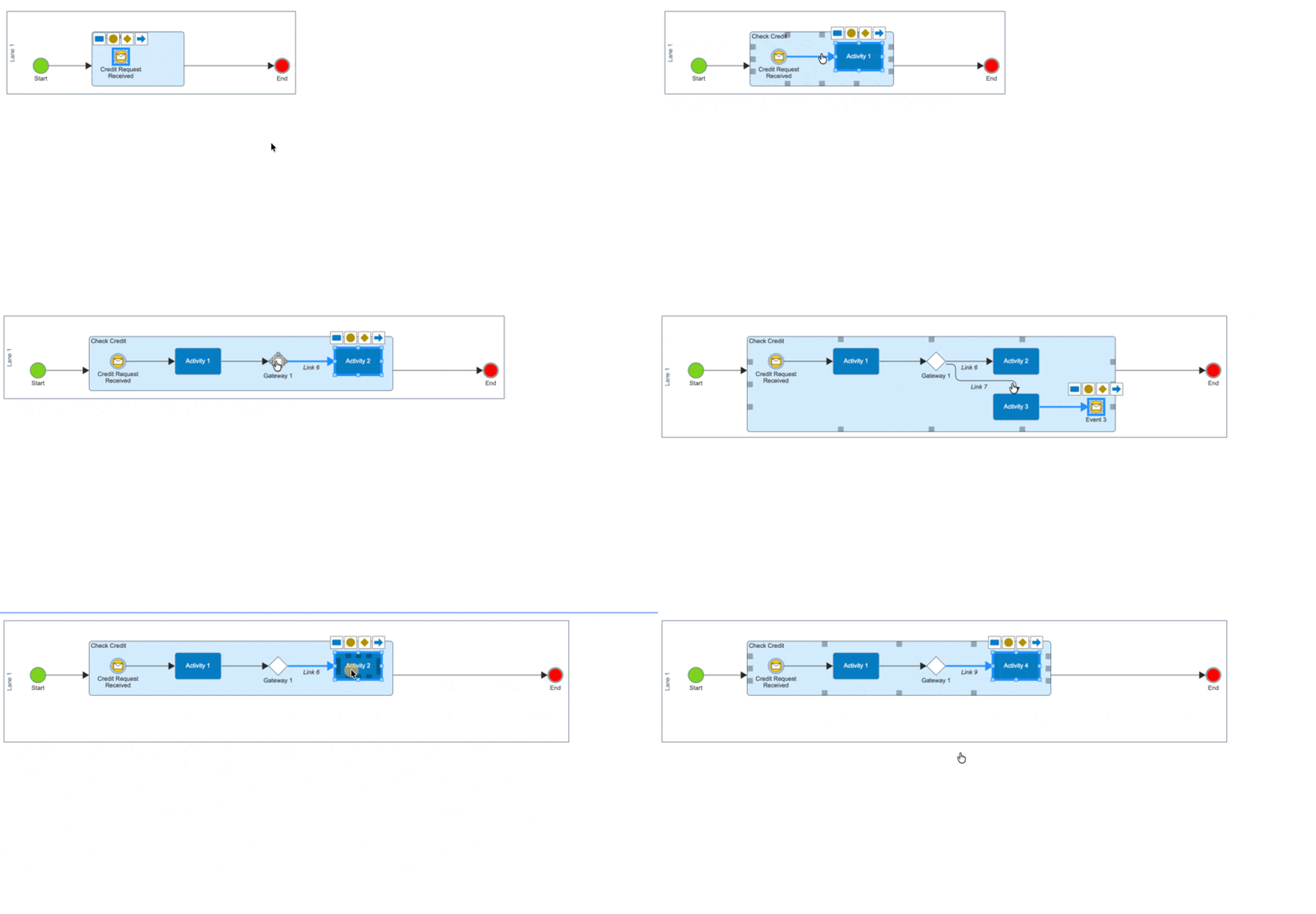
Alongside that, we've tightened up several edge cases. Dragging a step out of an embedded sub-process into a lane now correctly associates the step with the lane it lands in, rather than leaving it visually correct but offset when you reload. Copy-and-pasting activities into an embedded sub-process now places the pasted items where you dropped them rather than at an offset. And using a Quick Link on a step inside the container now creates the new step inside the container, rather than outside it or at the top of the diagram.
Resolved issues in Author
The following issues in Author have been resolved.
- The Show / Hide comments filter in both Author and Output was not toggling comments.
- Some model links inside Process activities were broken in Process output when the folder path contained an ampersand (&).
Process
The following issues in Process have been resolved.
- The Show business metrics markers option under View → Show/Hide (and the equivalent filter in HTML output) was not actually showing or hiding the markers.
- Images placed inside the Work instructions field of a process activity's details tray were not rendering in HTML output, even though they worked in Author, PDF, and Document view.
Output
Reviewers and approvals now appear in PDF output
Document control is a piece of compliance evidence, and for customers running multi-step reviews your PDF outputs need to tell the same story as your live documents do. This release brings the PDF output's document control information into line with HTML output — so reviewers, approvers and step participants are now all visible in the PDF.
Resolved issues in Output
- In Monarch output for Document models, the Reviewers and Approvals sections of Document Control were not being displayed at all.
- The document control section of PDF output didn't always reflect the most recent version state when a workflow had multiple review steps driving version increments.
- Viewer-role users could see comments through the per-step comment button in process output, even though the main comments button is (correctly) hidden for viewers — the two paths are now consistent.
Stencils & Customisation
Target stencil properties at specific licences or roles
If you customise stencils or extensions, you've probably run into the tradeoff between "one stencil for everyone" and splitting stencils apart to control who sees what.
Stencil and extension configurers can now mark individual properties as visible only to specific licences or roles. That means one stencil can serve multiple audiences — power authors see the full property set, everyday authors see the subset that's relevant to them — without the maintenance overhead of keeping parallel stencils in sync, and without having to fall back on access control on the model itself.
Library
A safety net for the Stakeholders area
In new libraries, we've added an access control that makes the Stakeholders area read-only to Authors, so models can't be moved into it. This prevents accidental moves that would otherwise take a model out of your Authors' day-to-day view.
This change applies to new libraries only — existing libraries keep their current access model unless you ask for the new behaviour.
Better visibility of save errors for Data Source authors
When a data source fails to save, the underlying error now surfaces in the model's issues / verify view rather than only appearing in server logs. Data Source authors can see and respond to the problem without needing a developer to dig through back-end logs.
Resolved issues in the Library
The following issues in the Library have been resolved.
- Visio importer: some shapes were coming in without a recognisable thumbnail, making it hard to identify what they were meant to be during mapping.
- Word importer: certain Word documents were failing to import with "Sequence contains no elements" or "Token EndElement in state EndRootElement" errors.
- Copying a model out of a read-only folder into a folder you own was returning a 403 Forbidden and a red "error" banner.
- Changes to a model's searchable content were not being reflected in semantic search results until the index caught up.
- Stencil properties were not loading when adding a data field to a Components data source, leaving the property dropdown empty.
- Model comparison was not picking up some status changes, because certain status values were being stored locally rather than in model data.
- Deleting a workflow model was leaving the underlying row in place in the database.
- Deleting a model whose name contained a single quote was failing outright.
- Uploading the v8 configuration to a fresh library was failing on the first attempt because a dependent view was being created before its table existed.