
Process
Process Path Variants
Every process tells multiple stories. Whether it's the ideal "happy path," a specific business scenario, or a critical compliance route, you need a way to bring those journeys to life.
With Path Variants, you can tag steps within your process maps to define distinct pathways — then instantly highlight them in both Author and Output views. It's a powerful way to cut through complexity, focus stakeholder attention, and communicate exactly how work flows in different situations.
Want consistency across your organisation? Create a shared catalog of path variant names in Master Data, so everyone speaks the same language.
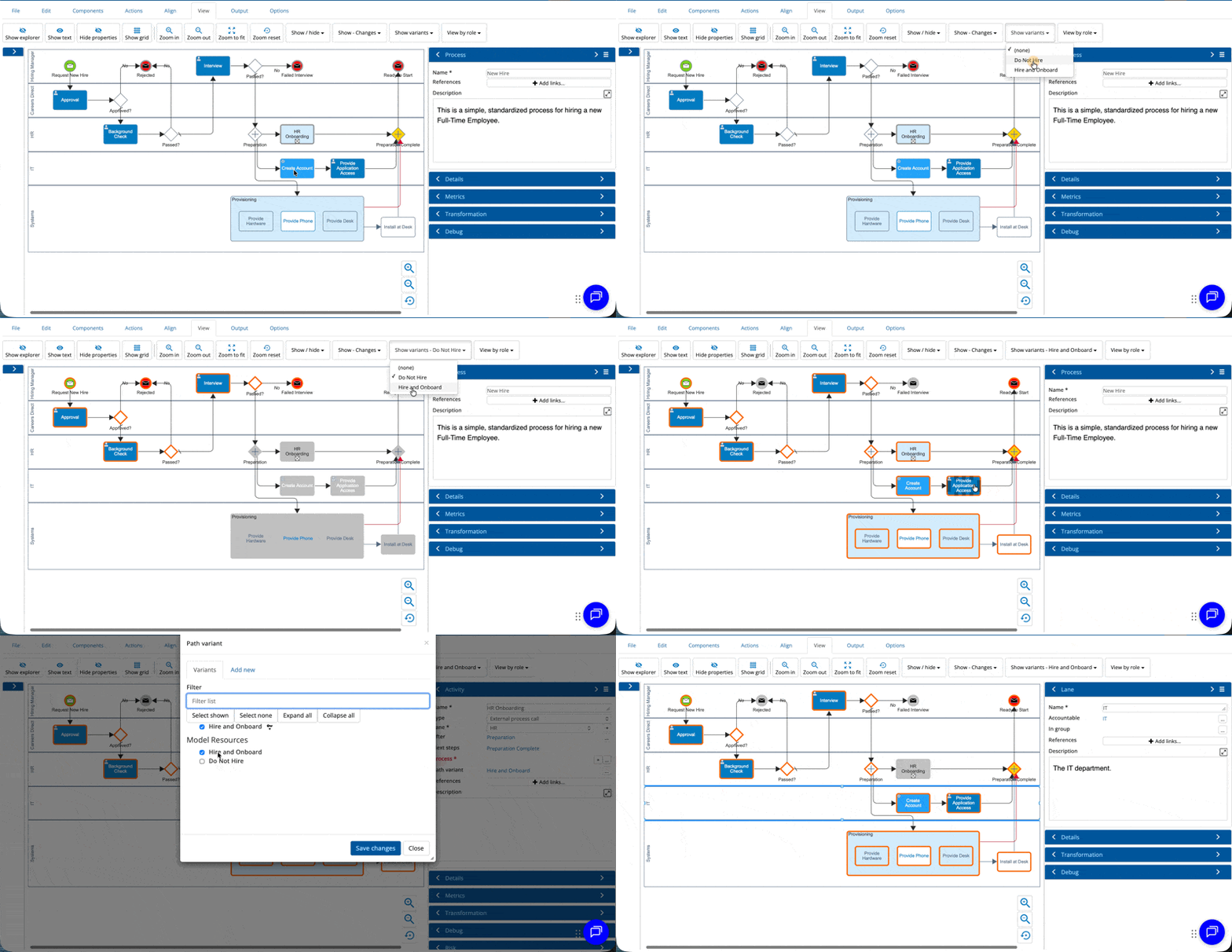
Process Path Variants is available on request — contact Customer Support to get it enabled for your environment.
Workflow Engine
We've upgraded our workflow engine infrastructure to deliver more consistent and predictable execution times. Your workflows are now better isolated from wider platform activity, so you'll experience smoother, more reliable performance even during busy periods.
No functional changes have been made to the running of workflows— your existing workflows will continue to work as before.
Workflow configuration has been enhanced in the email notifications. You can now include a link to the process comparison feature for the model. The reviewer or approver will be shown the comparison between the current version and the last version published.
Additionally the following issues have been resolved in workflow:
- When using a workflow with a verify failed link in some circumstances a model that has verification issues did not follow the verify failed link.
Rollout of the upgraded workflow engine will be phased over the coming days.
Author
The following issues in Author have been resolved
-
When adding an image to a component in a model and the component has multiple rich text boxes, the image was being added to both.
- Pasting of images into a rich text box was not being allowed.
- The edit of a component name was lost if you immediately clicked on the diagram.
- When creating a new model on a narrow width browser the dropdown menu for author and owner required a scroll off the screen.
- The ability to create a new user story directly from Author was not working.
- When hovering over a rich text property any tooltip displayed did not disappear when you moved away.
- When changing the component type any properties that do not apply to the new component type are now removed.
Import
The following issues in Import have been resolved
- When importing multiple process maps via CSV the diagram layout could go wrong.
- In some circumstances a Microsoft Visio shape was not being imported.
Server
The following changes to the server have been made
- Process probability calculations — previously based only on current state gateway volumes — now also include future state volumes, giving you richer what-if analysis data across your models.