
Accelerate your process creation with Discovery Agent—an AI-powered feature now available in BusinessOptix as an add-on for Author users. Whether you’re uploading SOPs, analysing images, or starting from scratch, Discovery Agent helps you convert content into process maps quickly and intelligently.
Discovery agent is a paid-for add-on. Please contact your account manager for details.
Smarter Process Mapping at Scale
Two Entry Points—You Choose Where to Begin
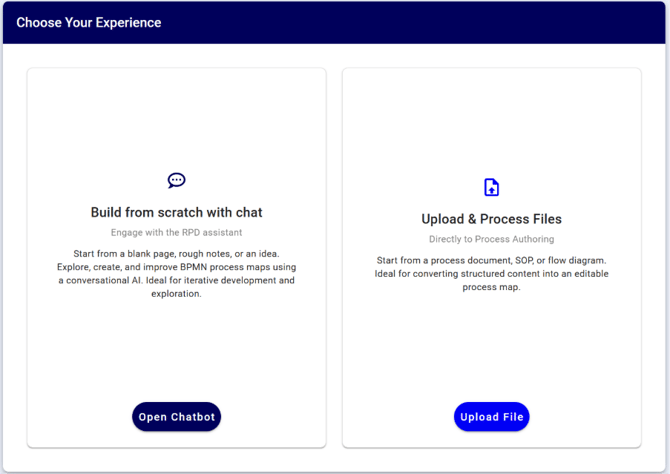
When launching Discovery Agent, users choose between two distinct starting points:
1. Start from Scratch (Chat)
Use this option when you want to build a process collaboratively with the AI, beginning with a blank slate, a rough idea or some messy notes.
- Interactive, conversational guidance
- No uploads supported in this path
- Ideal for exploratory or early-stage process creation
- Output is exported to Author View for final editing
2. Upload a Document, SOP, or Image
Use this option when you already have existing content.
- Uploads are immediately processed using AI
- After processing, choose your next step:
- Open in Chat for further exploration and refinement
- Open in Author to begin editing the generated map directly
✅ Accepted file types: .pdf, .docx, .pptx, .png, .jpeg
📌 Note: Discovery Agent processes one process at a time. If your file contains multiple processes, please split them before uploading. Multi-process support is planned in a future release. Images embedded in documents are not currently supported.
Designed for Authors
Only users with an Author license can access Discovery Agent. All outputs—whether imported or created via chat—are directed to the Author View for final editing and publishing.
Getting the Best Results when using chat
🧠 Be Specific and Clear
- ✅ “The process starts when a support ticket is submitted.”
- ❌ “We handle tickets.”
📄 Provide Context
- “This document outlines our onboarding process.”
- “This is a flow diagram of the procurement process.”
🔁 Build Iteratively
- Work through each section step-by-step.
- Use follow-up questions to refine the flow.
✅ Use Lists for Clarity
1. Submit request
2. Manager approves
3. IT fulfils
4. Confirmation sent
Working with the Discovery Agent: What to expect
Discovery Agent is designed to accelerate and augment your process creation—not to replace human judgment. Because it uses AI, results are not always predictable or identical each time. Just like humans, the AI interprets unstructured content using patterns and context, which means some level of subjectivity is involved.
Why Results May Vary
- AI is probabilistic, not rule-based. The same input may occasionally produce different results.
- Unstructured content—like free-form documents or images—requires interpretation, which can be subjective.
- Guidance matters. Providing more specific or structured input helps the AI generate better outcomes.
If something doesn’t look right, the best first step is to try again with clearer instructions or slight edits to your input. Small changes can lead to significantly better results.
We’re continuously improving Discovery Agent and releasing updates based on feedback. However, not all issues will result in a direct “fix”, since the AI doesn’t operate like traditional software. We’ll work with you to explore the best way to achieve your goals using the current model.
Current Functional Limitations
Discovery Agent is constantly improving. For now, be aware of these limitations:
- Discovery Agent can only interpret content relating to a single process at a time. Separate multi-process documents before use.
- Systems and roles are not yet extracted from documents—this is coming in the next release.
- Imported maps do not yet link to master data—steps must be manually connected.
- Embedded images in documents are not interpreted at this time.
- Chat sessions are not saved—you must export to Author View before exiting.
- Processing is in-browser—closing your browser will cancel the task.
We’ll continue to enhance these areas over time and will notify you as new functionality becomes available.
Reporting an issue with the Discovery Agent
If you encounter an unexpected or incorrect result, we’d love to hear from you. Because AI processing happens client-side and has limited logging, it's important to include the following when raising an issue:
- Original Input Document
- Please attach the file you used (.pdf, .docx, etc.)
- AI Output
- Save the generated map to Author View and share the link with us
- Advanced (Optional but Helpful): Console Output
- If you’re comfortable using browser developer tools, please include the following objects from the console:
- classifiedElements
- processNarrative
- processTable
- If you’re comfortable using browser developer tools, please include the following objects from the console:
If you’re not sure how to capture this, our support team can guide you through it.
Be part of the future
Discovery Agent customers will be among the first to access upcoming features before they are generally available. This includes advanced capabilities such as:
- Transcript Importing: Upload and interpret meeting notes and informal transcripts (under development)
- Linking to Master Data: Auto-link generated maps to existing roles, systems, and activities in your process library