
Author
Help
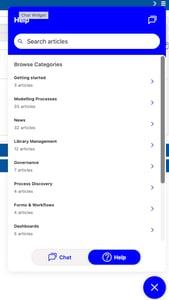 If you are seeking help on using BusinessOptix Author we have enhanced the functionality. Help is now directly integrated with our Knowledge Base and is available for you to use in chat, search or browsing for the information you require.
Revision Comparison
The Revision Comparison function which aids you understanding the changes made between two saved revisions of the same model has been enhanced to, optionally, include a more detailed audit trail and also better supports printing. When multiple authors made changes to a model the revision comparison feature can now provide details of which properties where amended by which author and when. Additionally when requesting print from the browser of the revision comparison output you can print the diagram and all the change details in a single document.
Rich Text Editor
Editing of tables in BusinessOptix Author has received a number of updates. This includes:
- The option to drag columns to resize them
- When viewing tables with a width less than 100% they will now be displayed at the selected width
- When viewing tables with no width information and lots of columns they will now be displayed no wider than the document output width or PDF page size.
- If you are using a table for presentation structure, and not for the display of tabular data, there is now a table style for 'layout'. No borders or color is applied to this table.
- All styling of the table is now stored in the table, to improve consistency between the editing and viewing experience.
Additionally if your user permissions allow you to edit the underlying HTML, then a scroll bar now appears to aid your navigating.
Other
- When a model has been deleted it was not always removed from the recent models list. This has been corrected.
- The model/file selection user interface has been updated and no longer allows you to delete a sub-folder that contains content. If the sub-folder has contents the Monarch Library Browse page is much better suited to tidying up content.
- Some error messages were not being clearly displayed, this has been corrected.
- The option to disable requesting new master data when editing a process model has been re-enabled.
- When changing a step name, minimizing the property tray and selecting another step this steps name was being updated. This has been corrected.
Login
For users who have the same username on multiple libraries and also use different authentication providers (for example Microsoft 365 and BusinessOptix) login state could in some circumstances get confused. This has been corrected.
For users who have different usernames on multiple libraries, but use the same email address login state could in some circumstances get confused. This has been corrected.
For users who are an Administrator on multiple libraries, but also use different usernames their admin rights were not always being honoured. This has been corrected.
Search
The following changes have been made to the BusinessOptix Search engine:
- When a library is configured to use semantic search and vector embeddings existed the search index was not being correctly updated on content save. This has been corrected.
- When a library is configured to use vector or hybrid search and the text of an individual component was exceptionally long the generation of embeddings failed and the content was not indexed completely. This has been corrected.
- When models are being published to other libraries using BusinessOptix workflow and the model is moved between folders the search index was not removing content on the moved from URL. This has been corrected.
Server and API Changes
The following changes have been made to server or API functionality:
- When a user was bookmarking a model it showed as a change/update on the model. This has been corrected.
- System for Cross Identity Management (SCIM) requests received with no user agent were failing. This has been corrected.
- A number of actions on models did not record the internal model identifier on the audit trail. This includes model deletion, email notification of comments and model changes notifications.
- A request to move or copy a file no longer supports changing extensions. This prevents losing a model contents, and also is required for information security requirements.