
Author
We've updated the content editing experience in Author. We've update the underlying software that provided the rich text editor and then using feedback from clients who are creating and editing longer form content in BusinessOptix we've made a number of changes to make creating and editing this content easier. This includes:
- Editing content is now available with AI support for process models. When you are creating step descriptions you can ask AI to write you a summary of the step. And at the process map and model level you can ask AI to write you the summary. You can also ask AI to review what you have written and re-phrase as required. [1]
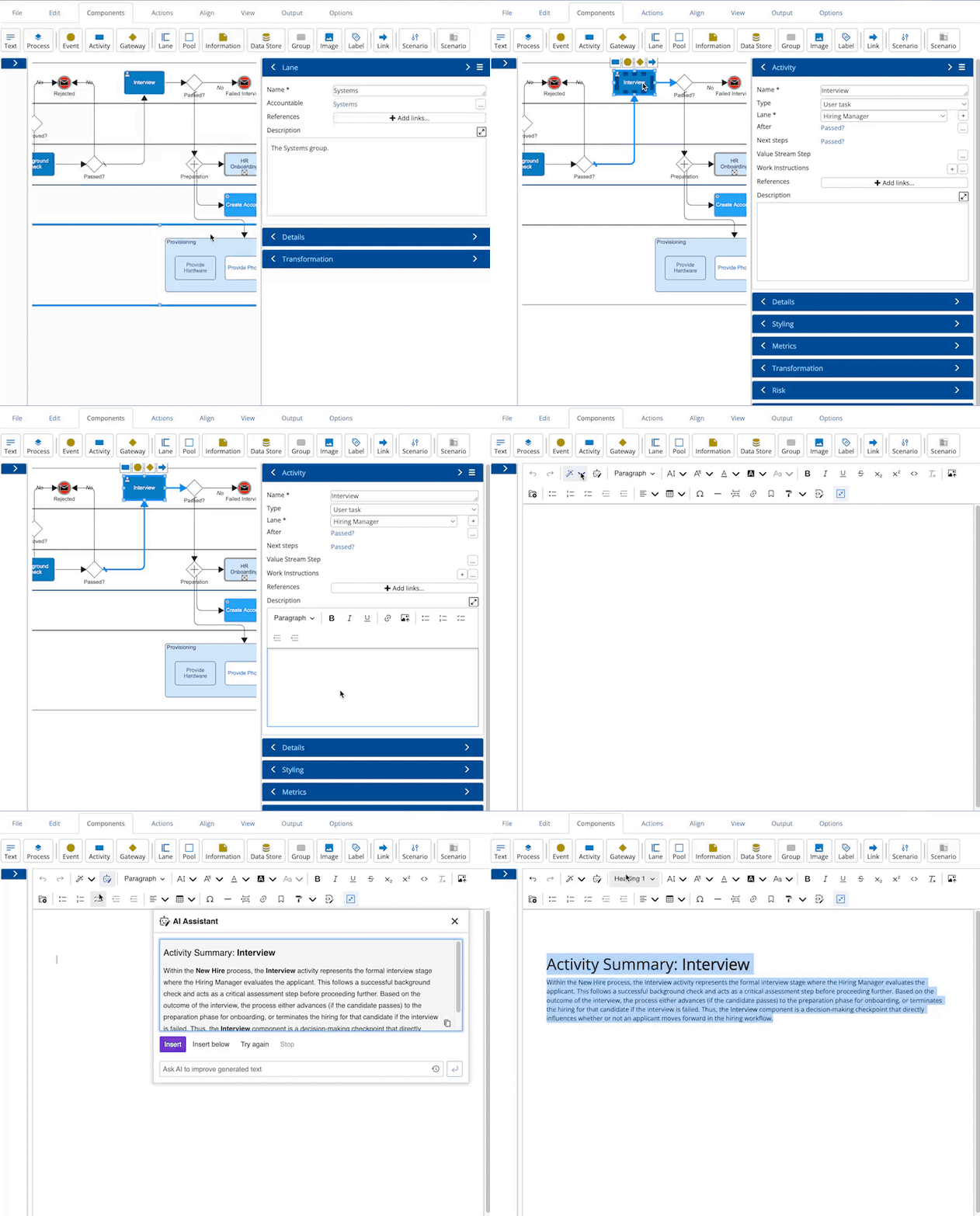
- When editing content in an unexpanded property tray, we've focused the editing toolbar on the most used functions. We've also made it easier to expand to full-screen.
- Full-screen mode has been changed to still enable navigation around the rest of Author and your model.
- If you have a boilerplate or template structure for specific content types we can make them easily available in Author. Please contact customer support with your template requirements.
Additionally we've corrected some issues.
- When a link is added between two steps in the process and the author forced the connection point on one end the link may not be perfectly horizontal. This has been corrected.
- When a model type is configured to not allow the delete of a component, it was not always being honored in Author. This has been corrected.
- Model verify was failing to record all issues when a group was added to a process model. This has been corrected.
Cognitive Search
We've made a few technical changes to cognitive search to enable future enhancements. This includes better handling of non-English content and adding a new Vector index to enhance the existing semantic index.
Server
- The link in email notifications to unsubscribe from comment email notification did not work in all circumstances. This has been corrected.
- In some circumstances SSO was not passing Relay state. This has been corrected.
- When a user tries to access a model or content they do not have access to, the access request is now logged.
- When a model is checked-out or checked-in the request is now logged.
- When a form submission is amended the change notification email includes business rule value changes that are hidden when the form is displayed to the user. These have been removed from the notification email.
- Moves of a model between folders are now shown in the Change details of the model, enabling better visibility of model re-organization over time.
- On a daily basis our customer support team will now receive an email advising of single sign-on certificates and bearertokens that are due to expire, in order that they can work with you to get them updated.
- To aid data source configurers who need to get information from various parts of the platform database we have created some standard views for model, component, property, lookup, reference and translation history. This makes it easier to get information from the Shared and Stakeholder information on components etc.
Import
- Word documents with a hyperlink at the end of a list were not importing. This has been corrected.
- Visio's created by some 3rd party diagramming tools were not importing completely. This has been corrected.
- Visio import mapping has been re-ordered to alphabetical to aid finding specific mappings.
Workflow
When a model is published with no revision information the issued information was not being set. This has been corrected.
Manage
- When importing a list of users to create it was possible to set-up a user with an invalid license type. This is no longer possible.
- When a library is set-up as an authenticating library and a user is deleted, the user details are also deleted from any library they had access to.
-
An access control group with an extremely long name failed to be created correctly. Validation has been added to prevent a group name longer than 50 characters from being created.
[1] AI features are only available in libraries that have upgraded to Monarch. Please contact your account manager to discuss.